Skip to content

Choose the language used throughout Hakomi.

Start free trial

Inventory and logistics for stand builders

The most expensive item is the one you forgot.

Know what is in every crate, what is on every truck and what came back. Stop costly site delays and emergency weekend re-orders.

Read the tour as text
  1. The most expensive item is the one you forgot. A stand builds itself up. Only the logo spot on the counter stays empty.
  2. A €50 sticker. A €1,000 weekend. Reprints and couriers run up the bill over the weekend. Then the four logo stickers turn up on Pallet 12.
  3. From the shelf to the booth, and back. A pallet travels from the warehouse onto the truck, to the booth and back home.
  4. Catch double bookings while you plan. Six LED wall panels for IFA Berlin 2026 overlap a reservation for another fair. Hakomi offers the two that are free, another location or other dates.
  5. Scan a pallet. See what is on it. Pallet 12 gets its label, and a phone scan shows the cable set, logo stickers and tool kit on it.
  6. Know what is on every truck. Truck 01 to Hannover fills up with seven articles and is marked as loaded.
  7. Unload the whole truck at the booth. A phone unloads Truck 01 at the booth, even without signal, and syncs when the connection is back.
  8. See what has not come back. After interzum Cologne 2026, the articles still out go back to the warehouse one by one.
  9. The office, the warehouse and the hall see the same status. The dashboard updates for everyone.
  10. Hakomi. Start free trial at hakomi.app.

Your world, in the app

Your fair dates, your crates, your trucks, your crew. All in Hakomi.

  • Fair dates

    Set-up, hand-over, event and dismantling for every project, in one calendar.

  • Crates and pallets

    Nested as deep as you pack, each with its own QR label.

  • Trucks

    Transport company, driver, license plate and loading time, inside the project.

  • Crews in three languages

    English, German or Polish. Each person picks their own.

The job cycle

From the shelf to the booth, and back.

Every fair runs the same loop, often late into the night. Hakomi follows each step of it, and every article in it.

In the warehouse, one worker loads white wall panels into a plywood crate on castors while a colleague packs a pallet collar crate for the same fair.
Hakomi reservation check for LED wall panel 50×50: Warehouse A has 8 units, only 2 are available for the selected dates because drupa Düsseldorf 2026 has 6 reserved from 15 to 28 December. Options: use available quantity, choose another location, change dates.

01Warehouse

Plan the fair.

Every project carries the fair's set-up, hand-over, event and dismantling dates. You reserve material for exactly those dates.

When two fairs overlap and both want the same LED wall panels, Hakomi catches the double booking while you plan, not on loading day.

  1. Only 2 of the 8 panels are free for these dates.
  2. The fair that already holds the other 6.
  3. Your way out: the free quantity, another location or other dates.

Project calendarHannover Messe 2026
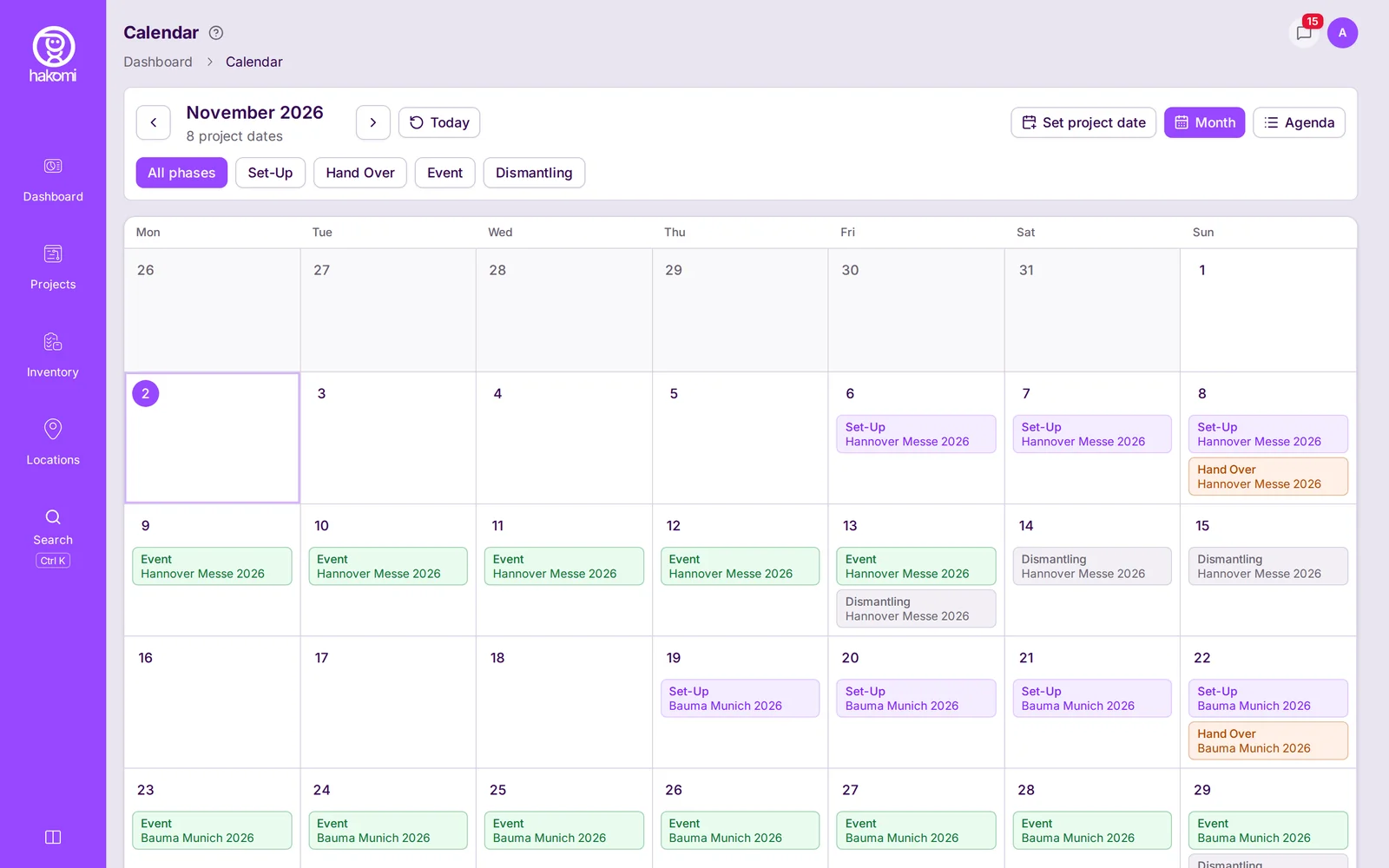
Hakomi calendar, zoomed in: Set-Up on 6, 7 and 8 November, Hand Over on the 8th, Event on the 13th and Dismantling on 13, 14 and 15 November for Hannover Messe 2026.
In the evening in a lit warehouse, a crew member kneels by a strapped wooden pallet crate and points his phone's camera at its label.
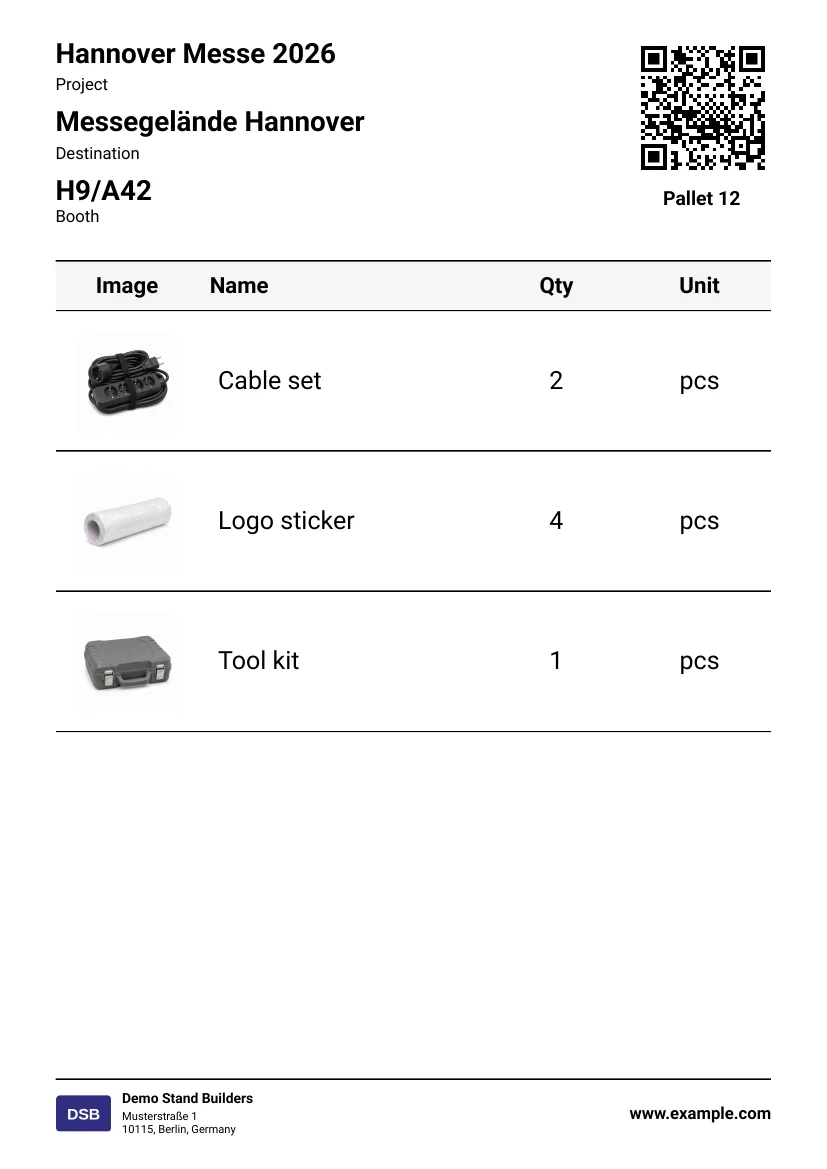
Printed Hakomi label for Pallet 12: the project Hannover Messe 2026, Messegelände Hannover and booth H9/A42 at the top left, a QR code at the top right, and a contents table with product photos: Cable set 2 pcs, Logo sticker 4 pcs and Tool kit 1 pcs.
Hakomi on a phone: scan Pallet 12 with the camera or type its code, and the pallet opens with its articles and their photos: Cable set 2, Logo sticker 4 and Tool kit 1.

02Pallet

Pick, label and pack.

Print QR labels for pallets, boxes and articles. Scan a pallet with the phone, or a handheld scanner, and see what is on it before you unwrap it.

Boxes go onto pallets and pallets onto trucks, nested as deep as you pack.

  1. Every pallet and box gets its own QR label, in four sizes: Small, Medium, A5 or A4.
  2. The label lists what is packed on it.
  3. Scan it with the camera, or type the code, to see its contents on the phone.

03Truck

Load the truck.

Each truck belongs to its project, with transport company, driver, license plate, loading and unloading times and a status from Not loaded to Loaded. One page lists every truck loading this week.

Fourteen days before set-up, Material at risk shows every project whose material is not yet all at the booth.

At blue hour, two crew members in high-visibility vests push a plywood crate on castors into a lit truck at a warehouse loading dock.
Hakomi trucks for Hannover Messe 2026: Truck 01 with plate H-SL 1234 from Schnell Logistics GmbH loads Thursday 5 November at 08:00 and unloads Friday 6 November at 07:00. Truck 01B loads Saturday 7 November at 07:00 and unloads at 11:00 the same day. Both have the status Loading and a Mark loaded button.
  1. The truck, its license plate and its transport company.
  2. When it loads and when it unloads. Truck 01 loads on Thursday, 5 November, at 08:00.
  3. Its status, from Not loaded to Loading to Loaded.

04Booth

Build on site.

At the hall, the crew taps Unload on Truck 01 and moves its whole load to the booth in one step. Pallets and boxes move as a whole, with everything on and in them.

Halls have bad signal. Moves, unloading at the booth and new articles are saved on the phone and sync when the connection is back.

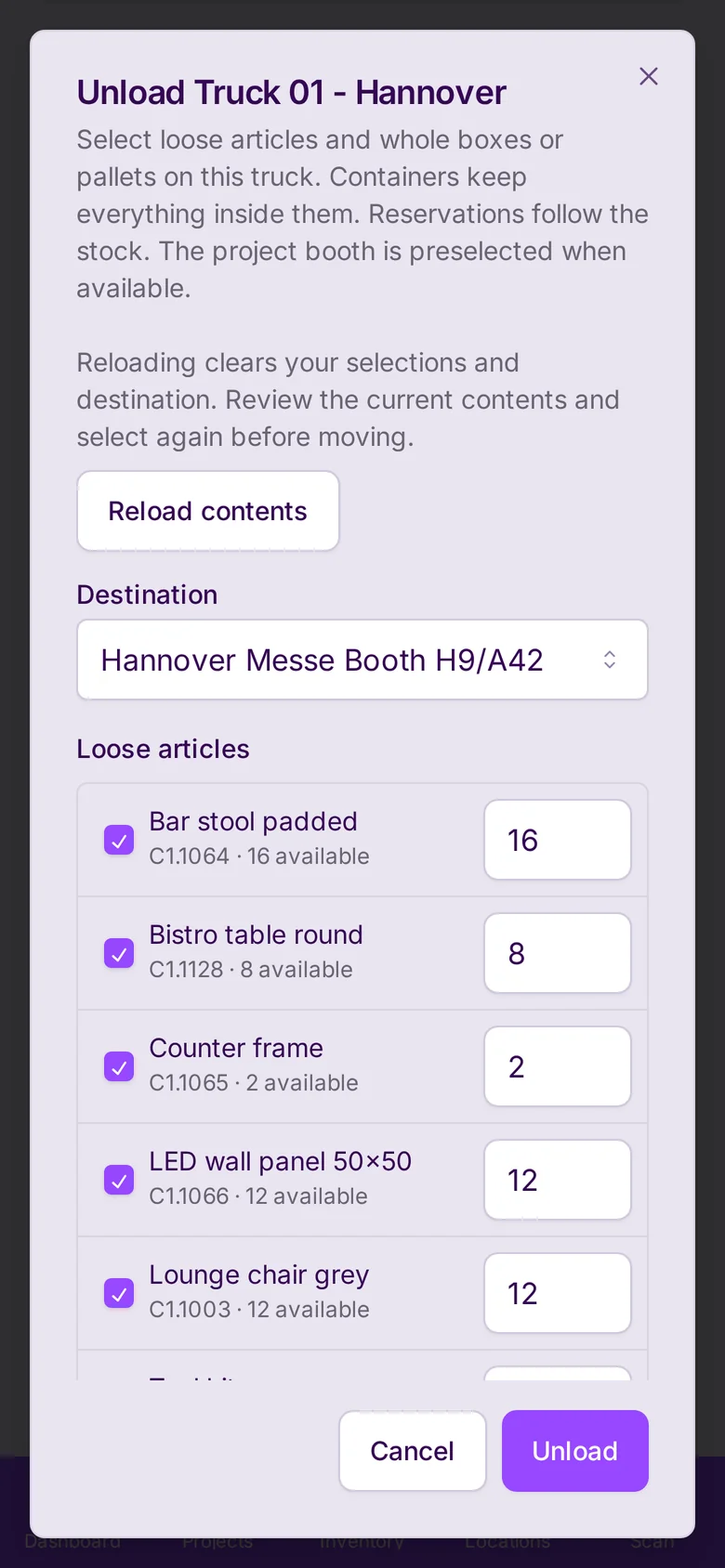
  1. The project's booth is preselected as the destination.
  2. Everything on the truck is checked. One tap on Unload.
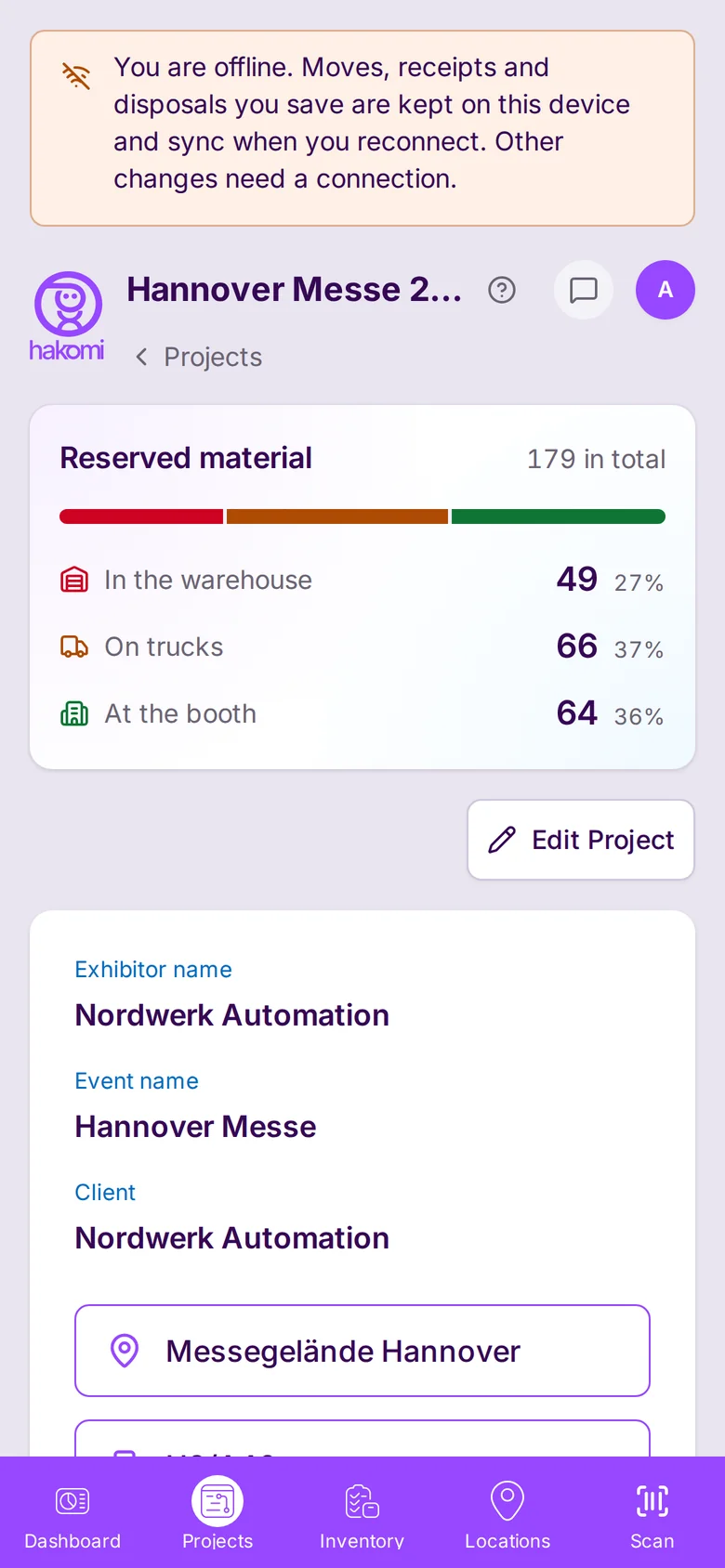
  3. No signal: the unloading waits on the phone and syncs later.
Two crew members fit a wall panel and screw a counter together on a stand under construction, next to opened plywood crates.
Hakomi on a phone: the Unload Truck 01 Hannover dialog, with the destination Hannover Messe Booth H9/A42 preselected, bar stools, bistro tables, counter frames, LED wall panels and lounge chairs checked, and an Unload button.
Hakomi project page on a phone with an offline banner: the moves you save are kept on this device and sync when you reconnect.

05Back home

Bring it back.

After the fair, Not returned lists what is still at the booth or on a truck. Each row has Return to warehouse or Mark as lost.

The activity history keeps every move: who, what, from where, to where and when.

Back in the warehouse, one crew member checks a truss segment on a workbench beside a crate of returned cables, while a colleague checks the plywood crates.
Hakomi Not returned for interzum Cologne 2026, due back Wednesday 21 October: carpet rolls and LED wall panels still at the booth, a counter frame and carpet rolls on Truck 06, each row with Return to warehouse and Mark as lost.
  1. Last location of each piece: still at the booth, or on a truck.
  2. Return to warehouse, or Mark as lost.

Walk the whole cycle with sample fair data.Your demo company comes with articles, warehouse bins, trucks and three fair projects.

Start free trial

Same status for everyone

The office, the warehouse and the hall see the same status.

Project managers, the warehouse team and the installation team work from the same status, on a computer or a phone.

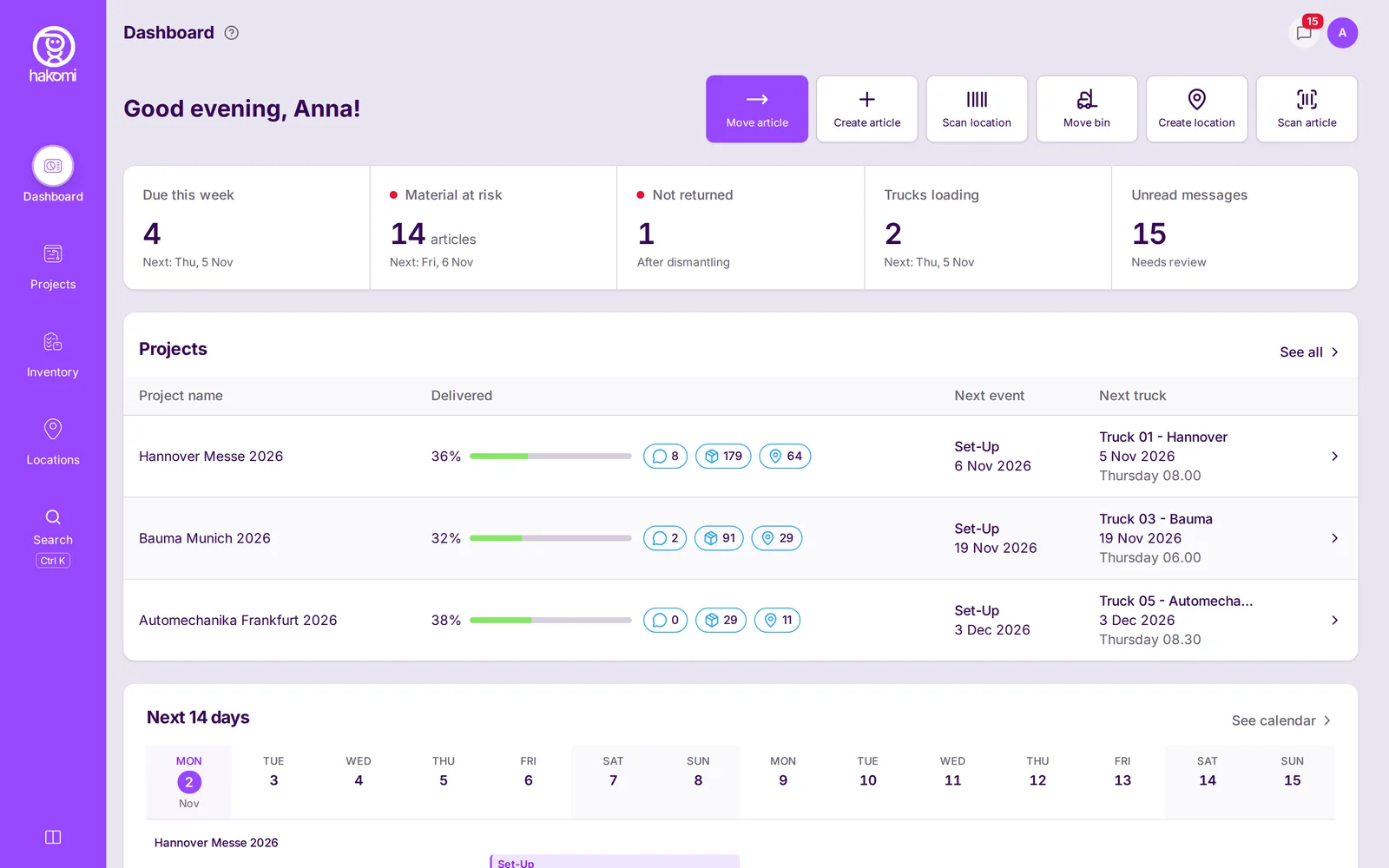
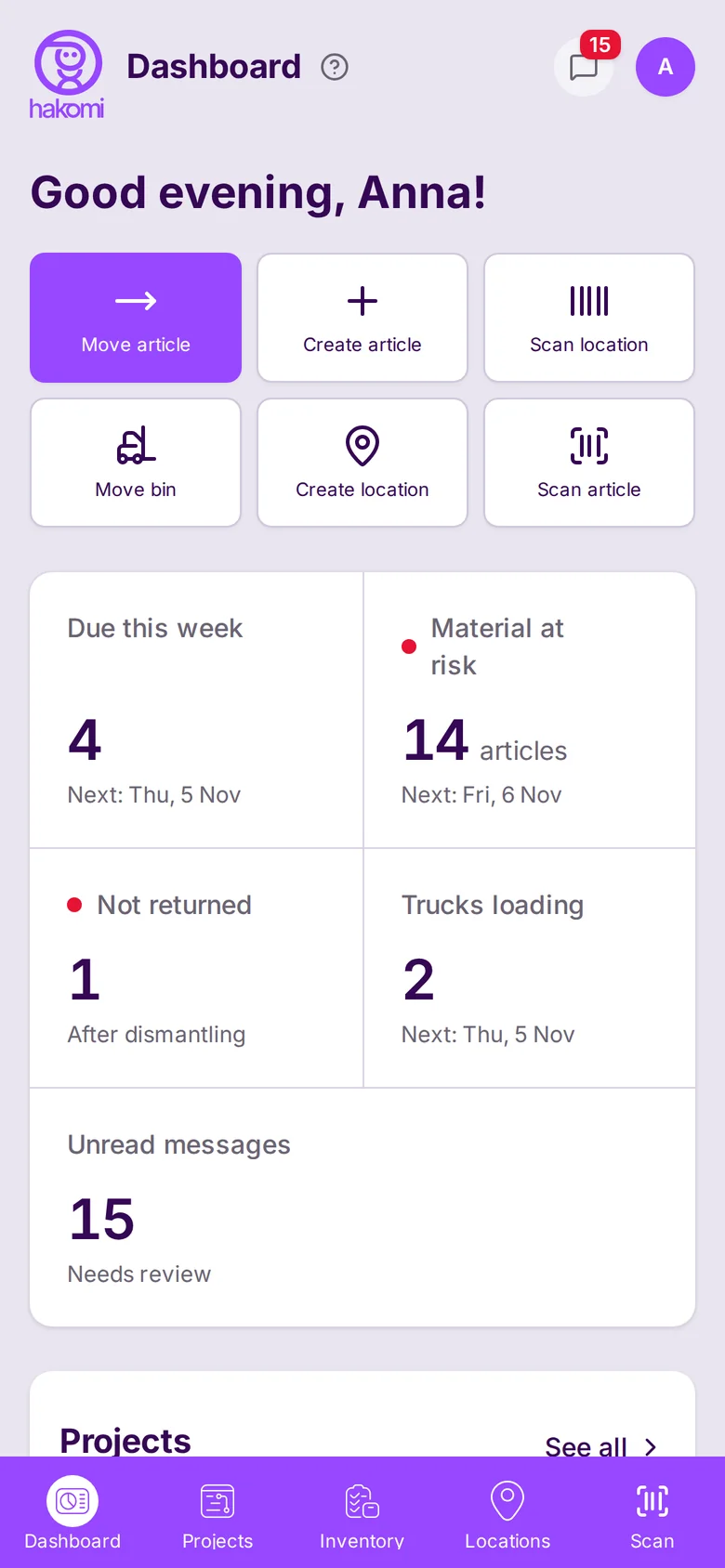
Hakomi dashboard on a computer: a status bar with Due this week 4, Material at risk 14 articles, Not returned 1, Trucks loading 2 and Unread messages 15, then projects Hannover Messe 2026, Bauma Munich 2026 and Automechanika Frankfurt 2026 with delivered share, next set-up date and next truck.
Hakomi dashboard on a phone: quick actions to move, create and scan, then the status tiles Due this week 4, Material at risk 14 articles, Not returned 1, Trucks loading 2 and Unread messages 15, with the next date where there is one.
  1. What needs attention: due this week, material at risk, not returned, trucks loading.
  2. How much of each project's material has reached the booth.
  3. The next set-up date and the next truck for each project.
  1. Move, create and scan, one tap away.
  2. What needs attention: due this week, material at risk, not returned, trucks loading.
  3. The next date for each, like Thursday, 5 November.
  • Project manager

    Reserves material for the fair dates, follows the trucks and sees what is at risk.

  • Warehouse team

    Scans, packs, loads and unloads on the phone, in English, German or Polish.

  • Installation team

    Unloads the truck at the booth, builds the stand and sends back what is left, on the phone.

Pricing

Try it free for one month.

  • Full user

    €50per month

    Scan, pack, load, unload and move.

  • View-only user

    €10per month

    Sees projects, stock and status.

Start free trial

After the trial, continue with a credit card. Prices per user and month, plus VAT.

A finished exhibition stand with a purple back wall glows in a dark, empty fair hall, while two crew members close the last plywood crate.

What's on the pallet? Hakomi knows.

Built together with the warehouse team of a working stand builder, who use it every day.

Free for one month.